
Hi, I’m yosi. I wrote a similar article for OpenGL 2.1, so I’m having intense déjà vu.
This time, I’d like to stage a moving first encounter between GLSL and Python.
I originally planned to introduce VAOs and GLSL in separate articles, but VAOs seem to be required from 3.x onward, and sure enough, you get an error without one.
Explaining GLSL requires knowing about VAOs, and explaining VAOs requires explaining GLSL. It’s a chicken-and-egg problem, and it’s a pain.
With a spec like this, the quickest way out is the explanation you’ve probably all heard at least once: “This part of the program is a magic spell, so don’t worry about it (tee-hee).” But I hate that way of teaching, so I’m not going to do it.
Fortunately, since we’re using Python, the explanations for the non-OpenGL parts can be kept short.
So this time, I’ll explain both VAOs and GLSL.
These are very important features, so let’s do our best!
This article uses the environment from part 1 and builds on the window code from part 2.
What is GLSL?
GLSL is the shader language used with OpenGL.
It lets you draw quickly, efficiently, and flexibly.
The GLSL language itself is based on C.
There are two kinds of GLSL shaders: vertex shaders and fragment shaders.
They do their processing per vertex and per pixel, respectively.
VAO (vertex array object)
A VAO is a feature that lets you write VBOs (Vertex Buffer Objects), which have existed since OpenGL 2.x, more concisely.
Let me explain in detail.
If you send the entire vertex coordinate array, normal array, and so on to the GPU every time you update the screen, you use up the CPU–GPU bandwidth in no time.
So, starting with 2.x, VBOs were introduced, which send that data to the GPU in advance before drawing.
With VBOs, you create something called a buffer object for each array, such as the vertex coordinate array and the normal array, and you had to enable them one by one every time you drew.
With a VAO, however, you only need to bind a single VAO object that has multiple buffer objects bound to it.
Let’s create that VAO object.
The data we’ll send is the coordinates and colors of three points.
positions = np.array([
    [0.0, 0.5, 0.0, 1.0],
    [0.5, -0.5, 0.0, 1.0],
    [-0.5, -0.5, 0.0, 1.0]], dtype=np.float32)
colors = np.array([
    [1.0, 0.0, 0.0, 1.0],
    [0.0, 1.0, 0.0, 1.0],
    [0.0, 0.0, 1.0, 1.0]], dtype=np.float32)
Create buffer objects and send the data to the GPU.
# Create the position buffer object and send the data to the GPU
position_vbo = glGenBuffers(1)
glBindBuffer(GL_ARRAY_BUFFER, position_vbo)
glBufferData(GL_ARRAY_BUFFER, positions.nbytes, positions, GL_STATIC_DRAW)

# Create the color buffer object and send the data to the GPU
color_vbo = glGenBuffers(1)
glBindBuffer(GL_ARRAY_BUFFER, color_vbo)
glBufferData(GL_ARRAY_BUFFER, colors.nbytes, colors, GL_STATIC_DRAW)

glBindBuffer(GL_ARRAY_BUFFER, 0)
Bind the VAO.
# Create and bind the VAO
vao = glGenVertexArrays(1)
glBindVertexArray(vao)
By binding VBOs and setting them up with glVertexAttribPointer before you unbind the VAO, you can encapsulate multiple VBOs in it.
You can also store the vertex index array in the VAO. Note that the first argument of glBindBuffer for it is GL_ELEMENT_ARRAY_BUFFER, not GL_ARRAY_BUFFER.
# Enable attribute variables 0 and 1
glEnableVertexAttribArray(0)
glEnableVertexAttribArray(1)

# Specify where the position buffer object goes (location = 0)
glBindBuffer(GL_ARRAY_BUFFER, position_vbo)
glVertexAttribPointer(0, 4, GL_FLOAT, GL_FALSE, 0, None)

# Specify where the color buffer object goes (location = 1)
glBindBuffer(GL_ARRAY_BUFFER, color_vbo)
glVertexAttribPointer(1, 4, GL_FLOAT, GL_FALSE, 0, None)

# Create the index buffer object and send the data to the GPU
indices = np.array([0, 1, 2], dtype=np.uint)
index_vbo = glGenBuffers(1)
glBindBuffer(GL_ELEMENT_ARRAY_BUFFER, index_vbo)
glBufferData(GL_ELEMENT_ARRAY_BUFFER, indices, GL_STATIC_DRAW)

# Unbind the buffer object and the VAO
glBindBuffer(GL_ARRAY_BUFFER, 0)
glBindVertexArray(0)
That completes the VAO object.
This time, the vertex array data was just coordinates and colors, but if you want to use other array data such as normals, do it the same way as for coordinates and colors.
A simple GLSL program
To draw, you need two kinds of shaders: a vertex shader and a fragment shader.
Vertex shader
First, let’s write the vertex shader, which uses the data transferred by the VAO.
In PyCharm, create a text file with File → New → File.
I named the file “shader.vert”.
Here’s the whole code.
#version 400 core

layout(location = 0) in vec4 position;
layout(location = 1) in vec4 color;
out vec4 outColor;

void main(void){
    outColor = color;
    gl_Position = position;
}
The first line says we’re using the core profile of GLSL version 400 (which corresponds to the OpenGL 4.0 core profile).
Next, it receives the coordinates and color at locations 0 and 1. Variables that receive input are marked with in. These locations 0 and 1 match the attribute numbers 0 and 1 that we set up in the VAO with glEnableVertexAttribArray and glVertexAttribPointer.
Conversely, variables passed on to the fragment shader are marked with out.
The vertex shader runs once per vertex.
In other words, it runs as many times as there are vertices (three times here).
In the main function, the received color is put into outColor, the variable passed to the fragment shader.
gl_Position is a GLSL built-in variable. You pass it the coordinates of the vertex to display.
Fragment shader
In the same way, create a file named something like “shader.frag”.
Here’s the whole code.
#version 400 core

in vec4 outColor;
out vec4 outFragmentColor;

void main(void){
    outFragmentColor = outColor;
}
The fragment shader runs for each pixel that is finally displayed.
The window here is 640×480, so it’s called 307,200 times.
outFragmentColor is assigned the color that is finally displayed for each pixel.
Let’s load the GLSL files!
For example, source files have the extension .c for C, .cpp for C++, and .java for Java.
Vertex shader and fragment shader files often have the extensions .vert and .frag, respectively.
I say “often” because GLSL source files are actually just text files.
You might say, “Come on, source files in every language are text files,” and, well, that’s true. But with GLSL, we ourselves have to read the source file as a string in C++ or Python and then compile it and so on. What a crappy spec.
There’s a reason for this: apparently it’s so the code can be compiled optimally for each device.
I understand the ideal, but it definitely raises the bar for beginners (;^_^A
But this time, we’re using Python!
It can be written concisely, so there’s nothing to fear.
To read the vertex shader file in Python, you could write
f = open(vertex_shader_file, 'r', encoding='utf-8')
vertex_shader_src = f.read()
f.close()
but with this, you might forget to call close, so write it like this instead.
# Read the source code from the shader file
with open(vertex_shader_file, 'r', encoding='utf-8') as f:
    vertex_shader_src = f.read()
Read the fragment shader file in the same way.
with open(fragment_shader_file, 'r', encoding='utf-8') as f:
    fragment_shader_src = f.read()
For both shaders, create a shader object, pass it the source code, and compile it.
vertex_shader = glCreateShader(GL_VERTEX_SHADER)
glShaderSource(vertex_shader, vertex_shader_src)
glCompileShader(vertex_shader)

fragment_shader = glCreateShader(GL_FRAGMENT_SHADER)
glShaderSource(fragment_shader, fragment_shader_src)
glCompileShader(fragment_shader)
Create a program object and attach the shaders.
Delete the shader objects once you’re done with them.
program = glCreateProgram()
glAttachShader(program, vertex_shader)
glDeleteShader(vertex_shader)
glAttachShader(program, fragment_shader)
glDeleteShader(fragment_shader)
Link the program object, and you’re done.
glLinkProgram(program)
Since we wrote it in Python, it’s concise, but in C++ it gets quite long-winded, like this.
In C, it’s even more of a hassle. (I don’t feel like writing it, so refer to resources such as the website of Professor Tokoi at Wakayama University, which is in Japanese.)
Drawing with the shaders and the VAO
To enable the shader you compiled earlier, write
glUseProgram(program)
Then bind the VAO and draw with glDrawElements. You can see this in the main loop of the whole program below.
The whole program
I’ve moved some parts into functions.
from OpenGL.GL import *
import glfw
import numpy as np


def create_program(vertex_shader_file, fragment_shader_file):
    # Read the source code from the shader file
    with open(vertex_shader_file, 'r', encoding='utf-8') as f:
        vertex_shader_src = f.read()

    # Pass the source code to the new shader object and compile it
    vertex_shader = glCreateShader(GL_VERTEX_SHADER)
    glShaderSource(vertex_shader, vertex_shader_src)
    glCompileShader(vertex_shader)

    with open(fragment_shader_file, 'r', encoding='utf-8') as f:
        fragment_shader_src = f.read()

    fragment_shader = glCreateShader(GL_FRAGMENT_SHADER)
    glShaderSource(fragment_shader, fragment_shader_src)
    glCompileShader(fragment_shader)

    # Create the program object and attach the shaders
    program = glCreateProgram()
    glAttachShader(program, vertex_shader)
    glDeleteShader(vertex_shader)
    glAttachShader(program, fragment_shader)
    glDeleteShader(fragment_shader)

    # Link the program object
    glLinkProgram(program)

    return program


def create_vao():
    indices = np.array([0, 1, 2], dtype=np.uint)
    positions = np.array([[0.0, 0.5, 0.0, 1.0], [0.5, -0.5, 0.0, 1.0], [-0.5, -0.5, 0.0, 1.0]], dtype=np.float32)
    colors = np.array([[1.0, 0.0, 0.0, 1.0], [0.0, 1.0, 0.0, 1.0], [0.0, 0.0, 1.0, 1.0]], dtype=np.float32)

    # Create the position buffer object and send the data to the GPU
    position_vbo = glGenBuffers(1)
    glBindBuffer(GL_ARRAY_BUFFER, position_vbo)
    glBufferData(GL_ARRAY_BUFFER, positions.nbytes, positions, GL_STATIC_DRAW)

    # Create the color buffer object and send the data to the GPU
    color_vbo = glGenBuffers(1)
    glBindBuffer(GL_ARRAY_BUFFER, color_vbo)
    glBufferData(GL_ARRAY_BUFFER, colors.nbytes, colors, GL_STATIC_DRAW)

    glBindBuffer(GL_ARRAY_BUFFER, 0)

    # Create and bind the VAO
    vao = glGenVertexArrays(1)
    glBindVertexArray(vao)

    # Enable attribute variables 0 and 1
    glEnableVertexAttribArray(0)
    glEnableVertexAttribArray(1)

    # Specify where the position buffer object goes (location = 0)
    glBindBuffer(GL_ARRAY_BUFFER, position_vbo)
    glVertexAttribPointer(0, 4, GL_FLOAT, GL_FALSE, 0, None)

    # Specify where the color buffer object goes (location = 1)
    glBindBuffer(GL_ARRAY_BUFFER, color_vbo)
    glVertexAttribPointer(1, 4, GL_FLOAT, GL_FALSE, 0, None)

    # Create the index buffer object and send the data to the GPU
    index_vbo = glGenBuffers(1)
    glBindBuffer(GL_ELEMENT_ARRAY_BUFFER, index_vbo)
    glBufferData(GL_ELEMENT_ARRAY_BUFFER, indices, GL_STATIC_DRAW)

    # Unbind the buffer object and the VAO
    glBindBuffer(GL_ARRAY_BUFFER, 0)
    glBindVertexArray(0)

    return vao


def main():
    # Initialize GLFW
    if not glfw.init():
        return

    # Create a window
    window = glfw.create_window(640, 480, 'Hello World', None, None)
    if not window:
        glfw.terminate()
        print('Failed to create window')
        return

    # Create the context
    glfw.make_context_current(window)

    # Specify the version
    glfw.window_hint(glfw.CONTEXT_VERSION_MAJOR, 4)
    glfw.window_hint(glfw.CONTEXT_VERSION_MINOR, 0)
    glfw.window_hint(glfw.OPENGL_PROFILE, glfw.OPENGL_CORE_PROFILE)

    program = create_program('shader.vert', 'shader.frag')
    vao = create_vao()

    while not glfw.window_should_close(window):
        # Clear the buffer with the specified color
        glClearColor(0, 0, 0, 1)
        glClear(GL_COLOR_BUFFER_BIT | GL_DEPTH_BUFFER_BIT)

        # Enable the shader
        glUseProgram(program)

        glBindVertexArray(vao)

        # Draw using the bound VAO
        glDrawElements(GL_TRIANGLES, 3, GL_UNSIGNED_INT, None)

        glBindVertexArray(0)

        # Swap the buffers to update the screen
        glfw.swap_buffers(window)

        # Process events
        glfw.poll_events()

    # Destroy the window and terminate GLFW
    glfw.destroy_window(window)
    glfw.terminate()


# This is how you write a main function in Python
if __name__ == "__main__":
    main()
Result
You should get a result like this.
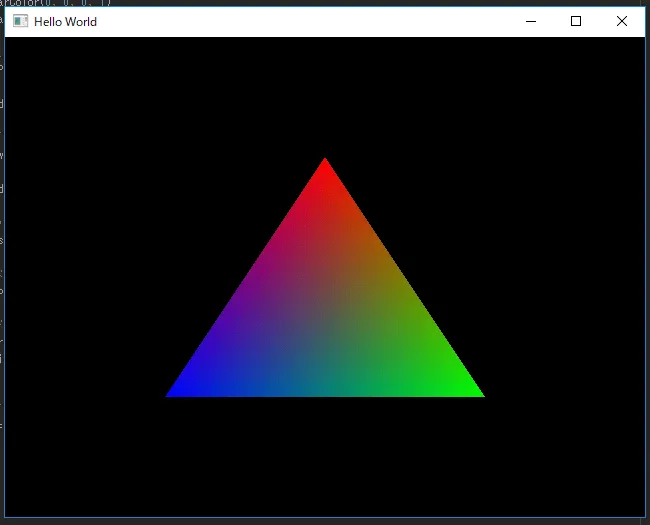
VAOs and the rest may have been difficult, but once you’ve built one, I think you won’t have much trouble with them anymore.