
This is part 2 of the series. (Part 1 covers setting up the environment.)
Hi, I’m yosi. I suddenly planned a camping trip for Golden Week, Japan’s spring holidays (and no, it’s not because I watched the anime Laid-Back Camp).
This time it’s more groundwork: we’ll specify the OpenGL version and display a window.
OpenGL versions are very confusing, but thankfully, recent versions have become much less so.
Specifying the OpenGL version
Create the context with
glfw.init()
window = glfw.create_window(640, 480, 'Hello World', None, None)
glfw.make_context_current(window)
and then specify the OpenGL 4.0 core profile like this.
glfw.window_hint(glfw.CONTEXT_VERSION_MAJOR, 4)
glfw.window_hint(glfw.CONTEXT_VERSION_MINOR, 0)
glfw.window_hint(glfw.OPENGL_PROFILE, glfw.OPENGL_CORE_PROFILE)
Specifying the core profile makes the old functions that are no longer used unavailable.
When OpenGL was upgraded to 2.x, some functions were removed because there had come to be far too many of them.
However, to stay compatible with older versions, OpenGL still lets programmers use the deprecated functions.
As an aside, OpenGL has something called extensions, which let you use some features of newer versions.
I only just learned that OpenGL 3.3 is meant to support as many OpenGL 4.0 features as possible on existing GPU hardware.
Well, extensions and version compatibility are a recipe for total confusion (and these days there’s little to gain from them), so I think you only need to look into it once you’re used to OpenGL and still curious, or when you actually need it.
Let’s display a window
Next, let’s display a window.
while not glfw.window_should_close(window):
    # Clear the buffer with the specified color
    glClearColor(1, 0, 0, 1)
    glClear(GL_COLOR_BUFFER_BIT | GL_DEPTH_BUFFER_BIT)

    # Swap the buffers to update the screen
    glfw.swap_buffers(window)

    # Process events
    glfw.poll_events()
This while loop is the main loop that does the drawing.
glClearColor(1, 0, 0, 1) sets the color used to clear the buffer to red, and glClear(GL_COLOR_BUFFER_BIT | GL_DEPTH_BUFFER_BIT) clears it.
The word “buffer” has come up a few times now, so here’s a picture of what it means.
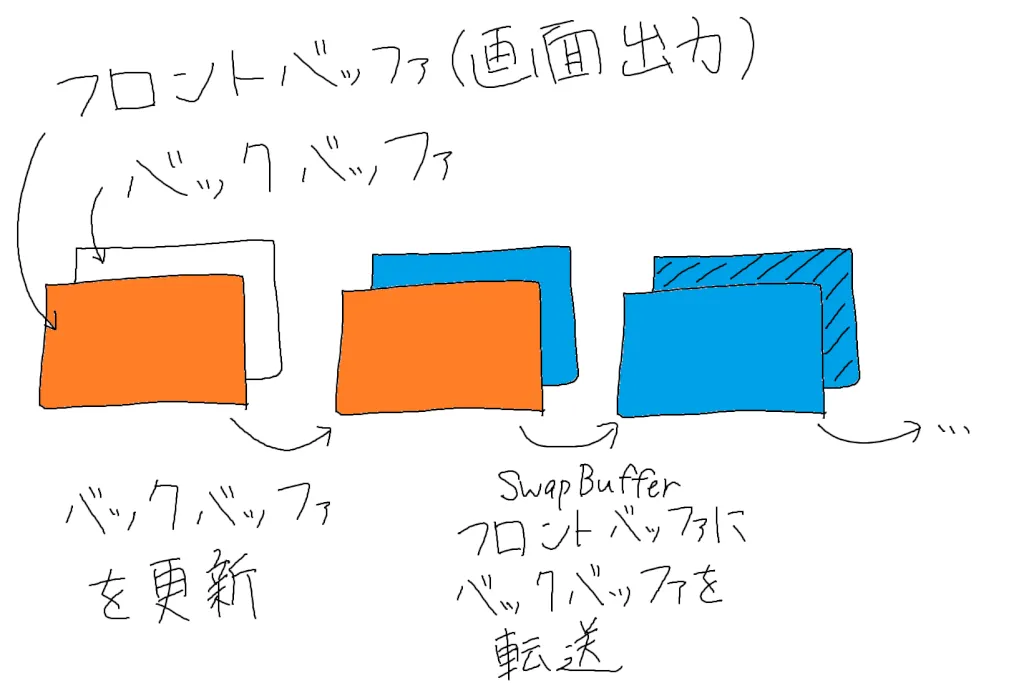
In the diagram: the front buffer is what’s shown on screen, and you update the back buffer behind it. SwapBuffer then transfers the back buffer to the front buffer, and the cycle repeats.
The front buffer is what’s shown on the screen.
What gets cleared is the back buffer.
The screen is updated by swapping these two with glfw.swap_buffers(window).
The reason for doing this is that the data in a buffer is updated in order, starting from the top left.
If you drew directly into the buffer shown on screen, then, in terms of the figure above, you could end up with part of the blue image shown at the top while the orange image is still shown at the bottom.
Using glfw.swap_buffers() lets you switch what’s on screen instantly.
The complete source code
Putting the code so far together, it looks like this.
# Import OpenGL and GLFW
from OpenGL.GL import *
import glfw


def main():
    # Initialize GLFW
    if not glfw.init():
        return

    # Create a window
    window = glfw.create_window(640, 480, 'Hello World', None, None)
    if not window:
        glfw.terminate()
        print('Failed to create window')
        return

    # Create the context
    glfw.make_context_current(window)

    # Specify the version
    glfw.window_hint(glfw.CONTEXT_VERSION_MAJOR, 4)
    glfw.window_hint(glfw.CONTEXT_VERSION_MINOR, 0)
    glfw.window_hint(glfw.OPENGL_PROFILE, glfw.OPENGL_CORE_PROFILE)

    while not glfw.window_should_close(window):
        # Clear the buffer with the specified color
        glClearColor(1, 0, 0, 1)
        glClear(GL_COLOR_BUFFER_BIT | GL_DEPTH_BUFFER_BIT)

        # Swap the buffers to update the screen
        glfw.swap_buffers(window)

        # Process events
        glfw.poll_events()

    # Destroy the window and terminate GLFW
    glfw.destroy_window(window)
    glfw.terminate()


# This is how you write a main function in Python
if __name__ == "__main__":
    main()
Result
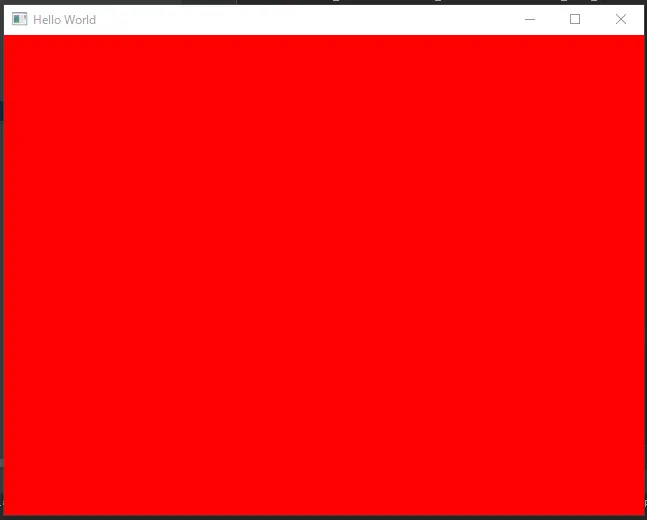
A window cleared to red is displayed.
Note that the GUI library used here is GLFW, so if you run into problems related to it, I recommend checking the official GLFW documentation.
The documentation is written for C++, so there are slight differences in naming conventions, arguments, and so on, but I think you’ll find it useful.