
This time, we finally get into practical content. We’ll draw a polygon, and then write our own GLSL shaders and load and run them from C++. The program builds on the one from the previous article.
While writing these explanations, I’ve realized that I don’t know what background knowledge to assume of you, my readers, and I feel like I’ve been wandering around quite a bit.
Whenever you come across something you don’t understand, look it up then and there. That’s the best way.
I look things up all the time while writing these explanations, too. Teaching is hard.
The viewing pipeline
The whole sequence of steps OpenGL goes through to draw a world is called the pipeline.
The image below roughly shows that flow.
The most important parts of it are the vertex shader and the fragment shader.
We programmers write these ourselves in a language called GLSL.
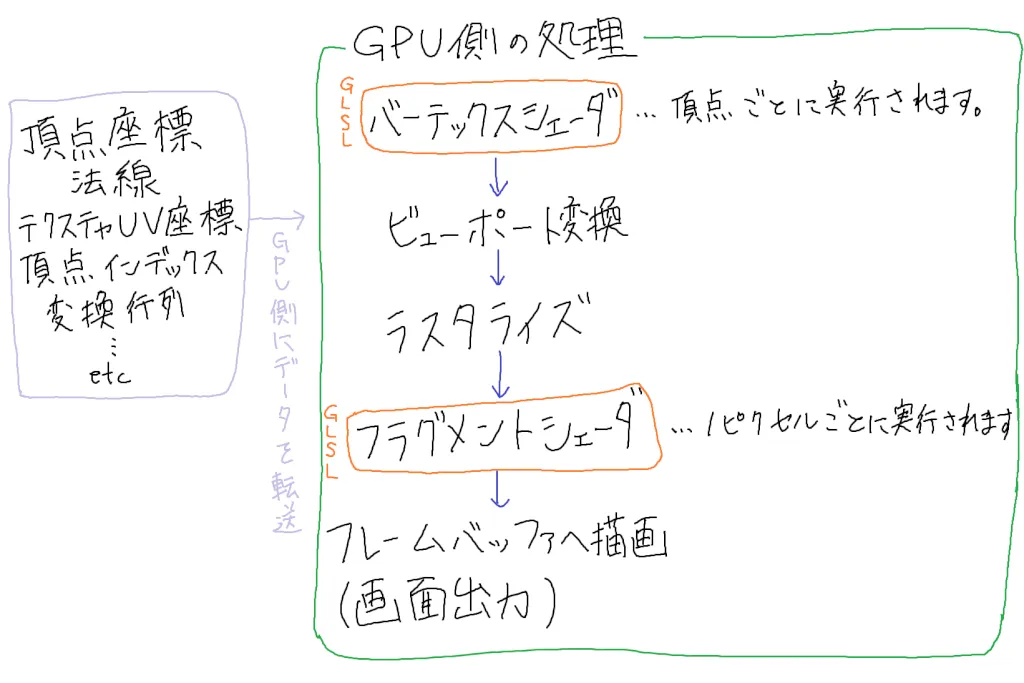
In the diagram: data such as vertex coordinates, normals, texture UV coordinates, vertex indices, and transformation matrices is transferred to the GPU. On the GPU, processing goes through the vertex shader (GLSL, runs once per vertex), the viewport transform, rasterization, and the fragment shader (GLSL, runs once per pixel), and is finally drawn to the framebuffer (output to the screen).
The vertex shader runs once per vertex. In other words, if there are three vertices, it runs three times.
The fragment shader runs once per pixel. A pixel is each individual dot on your computer screen.
The figure below shows what a displayed window looks like. Real pixels are nowhere near this big, of course, but I drew them large because drawing them small was a pain to make it easier to understand.
By computing the color of each of these pixels, OpenGL produces the final output image.
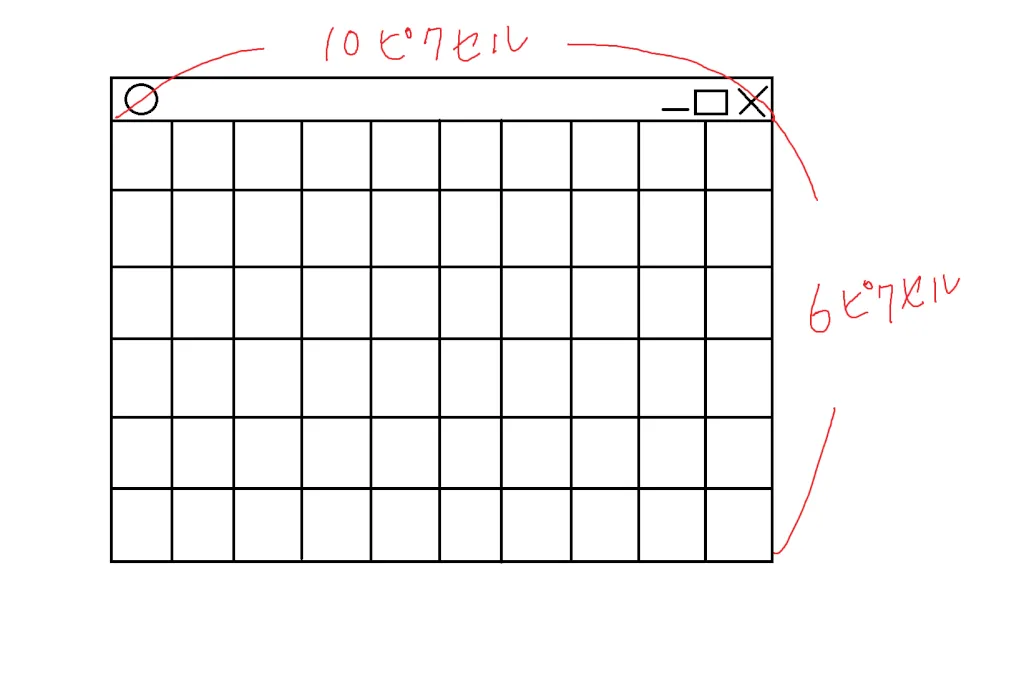
In the diagram, the window is 10 pixels wide and 6 pixels tall.
Displaying a polygon
The local coordinate system ranges from (-1,-1) to (1,1).
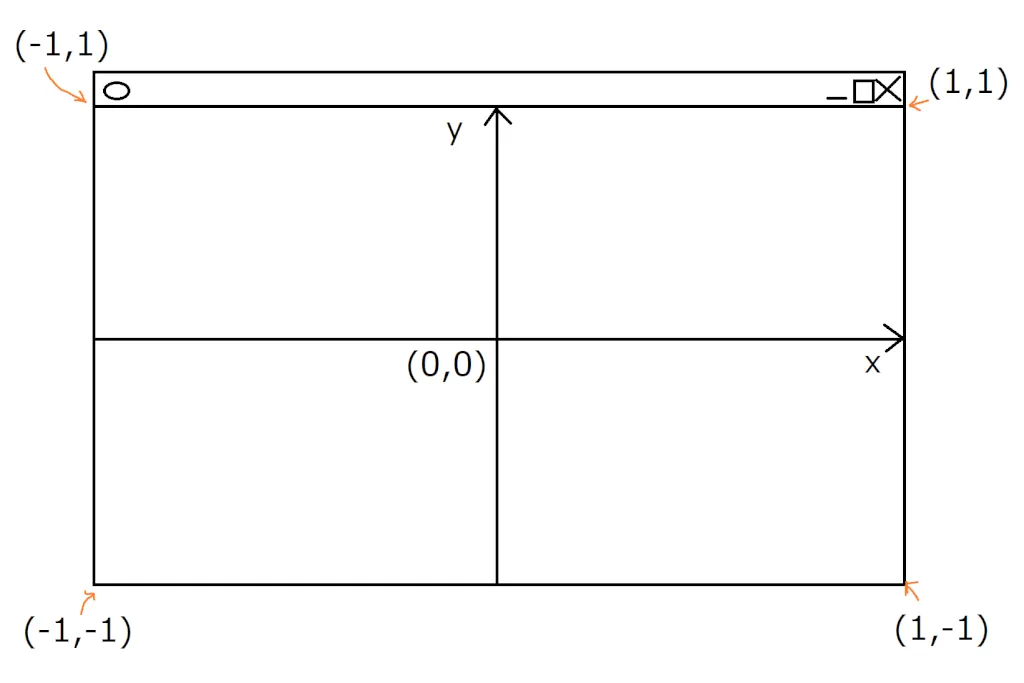
When it’s output to the screen, it’s stretched to fit the window size you specified (640 × 480 in the program below).
Let’s look at this with the following program.
#include "stdafx.h"
#include <iostream>
#include <gl/glew.h>
#include <GLFW/glfw3.h>

int main()
{
    // Initialize GLFW
    if (glfwInit() == GL_FALSE)
    {
        return -1;
    }

    // Create a window
    GLFWwindow* window = glfwCreateWindow(640, 480, "OpenGL Simple", NULL, NULL);
    if (!window)
    {
        glfwTerminate();
        return -1;
    }

    // Specify version 2.1
    glfwWindowHint(GLFW_CONTEXT_VERSION_MAJOR, 2);
    glfwWindowHint(GLFW_CONTEXT_VERSION_MINOR, 1);

    glfwMakeContextCurrent(window);
    glfwSwapInterval(0);

    // Initialize GLEW
    if (glewInit() != GLEW_OK)
    {
        return -1;
    }

    // Frame loop
    while (glfwWindowShouldClose(window) == GL_FALSE)
    {
        // Clear the buffer
        glClearColor(0.2f, 0.2f, 0.2f, 0.0f);
        glClear(GL_COLOR_BUFFER_BIT);

        // Set the color
        glColor4f(1.0, 0.0, 0.0, 1.0);

        // Send the three vertex coordinates to the GPU
        glBegin(GL_TRIANGLES);
        glVertex2f(   0,  0.5);
        glVertex2f(-0.5, -0.5);
        glVertex2f( 0.5, -0.5);
        glEnd();

        // Swap the double buffers
        glfwSwapBuffers(window);
        glfwPollEvents();
    }

    // Shut down GLFW
    glfwTerminate();

    return 0;
}
Here’s the result.
Now that I look closely, the title says “OpenGL Simple” when I meant “OpenGL Sample”… (^_^;)
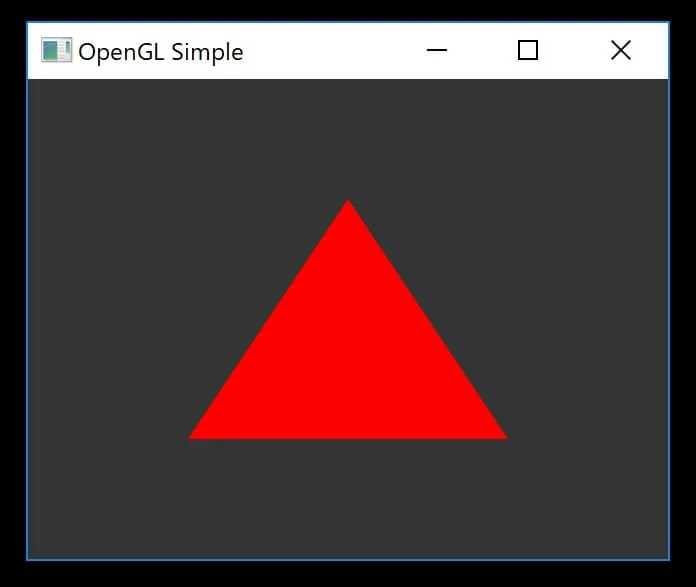
The part that has changed from the program in the previous article is the following.
        // Set the color
        glColor4f(1.0, 0.0, 0.0, 1.0);

        // Send the three vertex coordinates to the GPU
        glBegin(GL_TRIANGLES);
        glVertex2f(   0,  0.5);
        glVertex2f(-0.5, -0.5);
        glVertex2f( 0.5, -0.5);
        glEnd();
After setting the color, the code between glBegin and glEnd draws a triangle polygon from three vertices.
Actually, though, glBegin and glEnd were deprecated in OpenGL 3.0 and removed in OpenGL 3.1. So why did I use them? Because they’re handy for explaining things.
These days, the mainstream way to draw with OpenGL is a mechanism called VBO (Vertex Buffer Object), but it’s fairly complicated, so I’m using old code this time. Once I’ve explained VBOs (in Vertex Arrays and VBOs), you won’t see this code again.
Loading GLSL shader files
First, create the files where you’ll write the GLSL shader programs.
GLSL is a language that extends C, and you use it to describe processing on the GPU.
As for file extensions, basically anything is fine as long as you can tell they’re shaders. Many people use “.vert/.frag”, but some use “.vertexshader/.fragmentshader”.
Here, I use “.vert/.frag”, name the files shader.vert and shader.frag, and create them in the same directory as the source code. We’ll write their contents later in this article.
To create them, go to File → New → File in Visual Studio and choose Text File to create a “.txt” file, and then rename it, extension included.
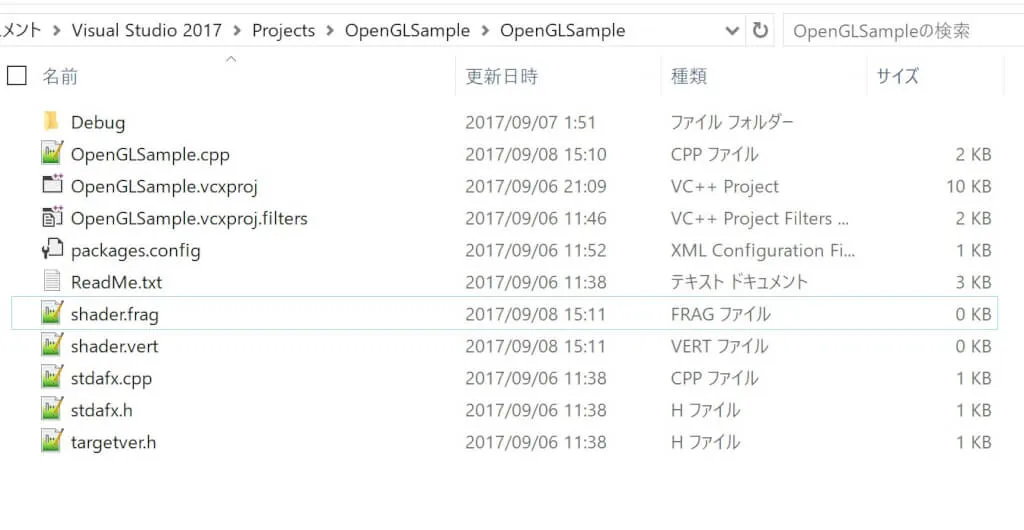
Interestingly, GLSL shader source code is compiled when the program runs. This is so it can be optimized for each user’s GPU.
Let’s write a program that loads the shader files we just created.
Here’s a shocking fact: OpenGL has no function for loading these files. In other words, you have to write one yourself (lol).
I wrote mine in C++, so it’s much simpler than it would be in C. Here’s the function I wrote.
// (omitted)
#include <iostream>
#include <string>
#include <fstream>
#include <sstream>
// (omitted)

int readShaderSource(GLuint shaderObj, std::string fileName)
{
    //Read the file
    std::ifstream ifs(fileName);
    if (!ifs)
    {
        std::cout << "error" << std::endl;
        return -1;
    }

    std::string source;
    std::string line;
    while (getline(ifs, line))
    {
        source += line + "\n";
    }

    // Load the shader source code into the shader object
    const GLchar *sourcePtr = (const GLchar *)source.c_str();
    GLint length = source.length();
    glShaderSource(shaderObj, 1, &sourcePtr, &length);

    return 0;
}
A bit late to mention this, but the program contains things like “std::something.” Just think of them as features in a namespace named std. They’re unrelated to the topic of this article, so I won’t explain them here.
Of the included headers, string is for handling strings, and fstream and sstream are for reading files.
The parameter shaderObj of readShaderSource is a shader object, which I’ll come back to later. Likewise, the parameter fileName receives the shader file name: “shader.vert” or “shader.frag” in this example.
std::ifstream ifs(fileName);
prepares the file for reading, and then
    std::string source;
    std::string line;
    while (getline(ifs, line))
    {
        source += line + "\n";
    }
this while loop reads the file one line at a time and stores the contents in line.
Each line is then appended, together with a newline character, to the end of source.
source += line + "\n"; means the same as source = source + line + "\n";. With std::string, you can concatenate strings with “+”.
Now the entire contents of the shader file are stored in the string source.
    // Load the shader source code into the shader object
    const GLchar *sourcePtr = (const GLchar *)source.c_str();
    GLint length = source.length();
    glShaderSource(shaderObj, 1, &sourcePtr, &length);
c_str() gives you a char pointer from a std::string. Wow, that’s super handy.
source.length() gets the length of the string source.
Pass these as arguments to glShaderSource(), and the source code is loaded into the shader object. (It gets compiled in the next section.)
A program for running the shaders
Here’s the sequence of steps for enabling a shader program.
- Create a shader object with glCreateShader(), and load the source code into it with glShaderSource().
- Compile it with glCompileShader.
- Create a program object with glCreateProgram().
- Attach the shader objects to the program object with glAttachShader().
- Delete the shader objects with glDeleteShader().
- Link the program object with glLinkProgram().
- Enable the shader with glUseProgram().
You could call glUseProgram() before the while loop, but if you want to switch shaders depending on the object, for example, you can do that by calling it inside the while loop.
So, to make all this easy to use, I’ll write a makeShader() function.
It returns the program object, and the main function enables that program object with glUseProgram().
#include "stdafx.h"
#include <iostream>
#include <string>
#include <fstream>
#include <sstream>
#include <gl/glew.h>
#include <GLFW/glfw3.h>

int readShaderSource(GLuint shaderObj, std::string fileName)
{
    //Read the file
    std::ifstream ifs(fileName);
    if (!ifs)
    {
        std::cout << "error" << std::endl;
        return -1;
    }

    std::string source;
    std::string line;
    while (getline(ifs, line))
    {
        source += line + "\n";
    }

    // Load the shader source code into the shader object
    const GLchar *sourcePtr = (const GLchar *)source.c_str();
    GLint length = source.length();
    glShaderSource(shaderObj, 1, &sourcePtr, &length);

    return 0;
}

GLint makeShader(std::string vertexFileName, std::string fragmentFileName)
{
    // Create the shader objects
    GLuint vertShaderObj = glCreateShader(GL_VERTEX_SHADER);
    GLuint fragShaderObj = glCreateShader(GL_FRAGMENT_SHADER);
    GLuint shader;

    // Variables for the compile and link results
    GLint compiled, linked;

    /* Load the shader source code */
    if (readShaderSource(vertShaderObj, vertexFileName)) return -1;
    if (readShaderSource(fragShaderObj, fragmentFileName)) return -1;

    /* Compile the vertex shader source */
    glCompileShader(vertShaderObj);
    glGetShaderiv(vertShaderObj, GL_COMPILE_STATUS, &compiled);
    if (compiled == GL_FALSE)
    {
        fprintf(stderr, "Compile error in vertex shader.\n");
        return -1;
    }

    /* Compile the fragment shader source */
    glCompileShader(fragShaderObj);
    glGetShaderiv(fragShaderObj, GL_COMPILE_STATUS, &compiled);
    if (compiled == GL_FALSE)
    {
        fprintf(stderr, "Compile error in fragment shader.\n");
        return -1;
    }

    /* Create the program object */
    shader = glCreateProgram();

    /* Attach the shader objects to the shader program */
    glAttachShader(shader, vertShaderObj);
    glAttachShader(shader, fragShaderObj);

    /* Delete the shader objects */
    glDeleteShader(vertShaderObj);
    glDeleteShader(fragShaderObj);

    /* Link the shader program */
    glLinkProgram(shader);
    glGetProgramiv(shader, GL_LINK_STATUS, &linked);
    if (linked == GL_FALSE)
    {
        fprintf(stderr, "Link error.\n");
        return -1;
    }

    return shader;
}


int main()
{
    // Initialize GLFW
    if (glfwInit() == GL_FALSE)
    {
        return -1;
    }

    // Create a window
    GLFWwindow* window = glfwCreateWindow(640, 480, "OpenGL Sample", NULL, NULL);
    if (!window)
    {
        glfwTerminate();
        return -1;
    }

    // Specify version 2.1
    glfwWindowHint(GLFW_CONTEXT_VERSION_MAJOR, 2);
    glfwWindowHint(GLFW_CONTEXT_VERSION_MINOR, 1);

    glfwMakeContextCurrent(window);
    glfwSwapInterval(0);

    // Initialize GLEW
    if (glewInit() != GLEW_OK)
    {
        return -1;
    }


    GLint shader = makeShader("shader.vert", "shader.frag");

    // Frame loop
    while (glfwWindowShouldClose(window) == GL_FALSE)
    {
        // Clear the buffer
        glClearColor(0.2f, 0.2f, 0.2f, 0.0f);
        glClear(GL_COLOR_BUFFER_BIT);

        glUseProgram(shader);

        // Set the color
        glColor4f(1.0, 0.0, 0.0, 1.0);

        // Send the three vertex coordinates to the GPU
        glBegin(GL_TRIANGLES);
        glVertex2f(   0,  0.5);
        glVertex2f(-0.5, -0.5);
        glVertex2f( 0.5, -0.5);
        glEnd();

        // Swap the double buffers
        glfwSwapBuffers(window);
        glfwPollEvents();
    }

    // Shut down GLFW
    glfwTerminate();

    return 0;
}
There’s nothing in particular to explain here.
Now let’s write the shader programs that this program runs.
For now, make shader.vert and shader.frag look like this.
#version 120

//
// shader.vert
//

void main(void)
{
    gl_Position = gl_Vertex;
    gl_FrontColor = gl_Color;
}
#version 120
//
// shader.frag
//
void main(void)
{
gl_FragColor = gl_Color;
}The #version on the first line specifies the GLSL version.
It’s determined by the OpenGL version you use.
| OpenGL version | GLSL version | #version |
|---|---|---|
| 1.5 | 1.0 | |
| 2.0 | 1.1 | #version 110 |
| 2.1 | 1.2 | #version 120 |
| 3.0 | 1.3 | #version 130 |
| 3.1 | 1.4 | #version 140 |
| 3.2 | 1.5 | #version 150 |
| 3.3 | 3.3 | #version 330 |
| 4.0 | 4.0 | #version 400 |
| 4.1 | 4.1 | #version 410 |
| 4.2 | 4.2 | #version 420 |
| 4.3 | 4.3 | #version 430 |
| 4.4 | 4.4 | #version 440 |
| 4.5 | 4.5 | #version 450 |
This program has three vertices, so shader.vert runs three times.
Each time, glVertex2f() transfers the vertex coordinates to the built-in variable gl_Vertex.
gl_Position is where you assign the vertex position in the local coordinate system I explained near the beginning. Here, it’s simply assigned the value that gl_Vertex received.
gl_Color in shader.vert receives its value from glColor4f(). The value assigned to gl_FrontColor is received by gl_Color in shader.frag.
gl_FragColor is the color that’s finally output.
The built-in gl_ variables introduced here are all vec4 vectors. For a vertex, they represent (x, y, z, w); for a color, (r,g,b,a).
Now, if you run this,
you get the same result, so you can’t tell whether the programmable shaders are really being used. Let’s move the vertices and change the color, like this.
#version 120

//
// shader.vert
//

void main(void)
{
    gl_Position = gl_Vertex + vec4(0.0, 0.4 ,0.0, 0.0);
    gl_FrontColor = gl_Color;
}
#version 120
//
// shader.frag
//
void main(void)
{
gl_FragColor = gl_Color + vec4(0.0, 0.0, 0.6, 0.0);
}This moves every vertex by 0.4 along the y-axis and adds blue.
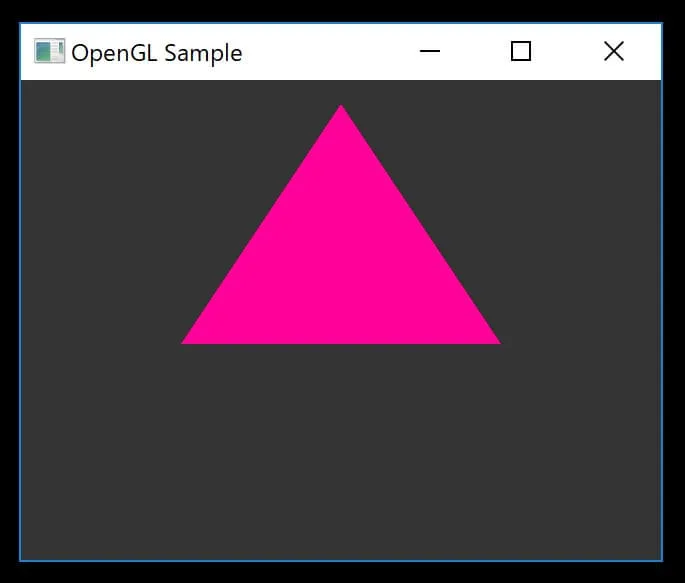
The shaders are clearly taking effect (^^)