As the title says, we’ll use GLFW from here on. GLUT (or FreeGLUT) would be fine too, but GLUT is a bit unintuitive, it makes contexts harder to understand, and it’s no longer maintained, which I assume is for good reason, so I’ll go with GLFW.
After trashing it like that, I have to admit that I always use GLUT myself (lol). Well, it doesn’t make a huge difference which one you choose, so I won’t stop anyone who says, “I’m using GLUT.” Just adapt the code as you go.
Before we start, there’s one important thing I need to tell you. Whether or not you do it will make a big difference in how fast you grow.
It’s this: don’t copy and paste the code. Type the programs out on the keyboard with your own hands.
If you just copy and paste my programs, the only one getting smarter is me (lol). Copying by hand may look primitive, but it’s surprisingly effective, so I recommend it. (The comments are there for explanation, so you don’t need to copy them.)
Let’s get started. We’ll use the Visual Studio project from Setting Up Visual Studio for OpenGL, where we installed GLFW and GLEW with NuGet.
A GLFW sample and how it works
First, here’s the whole program.
#include "stdafx.h"
#include <iostream>
#include <gl/glew.h>
#include <GLFW/glfw3.h>


int main()
{
    // Initialize GLFW
    if (glfwInit() == GL_FALSE)
    {
        return -1;
    }

    // Create a window
    GLFWwindow* window = glfwCreateWindow(640, 480, "OpenGL Simple", NULL, NULL);
    if (!window)
    {
        glfwTerminate();
        return -1;
    }

    // Specify version 2.1
    glfwWindowHint(GLFW_CONTEXT_VERSION_MAJOR, 2);
    glfwWindowHint(GLFW_CONTEXT_VERSION_MINOR, 1);

    // Create the context
    glfwMakeContextCurrent(window);
    glfwSwapInterval(1);

    // Initialize GLEW
    if (glewInit() != GLEW_OK)
    {
        return -1;
    }

    // Frame loop
    while (glfwWindowShouldClose(window) == GL_FALSE)
    {
        // Clear the buffer
        glClearColor(0.2f, 0.2f, 0.2f, 0.0f);
        glClear(GL_COLOR_BUFFER_BIT);

        // Swap the double buffers
        glfwSwapBuffers(window);
        glfwPollEvents();
    }

    // Shut down GLFW
    glfwTerminate();

    return 0;
}
Let’s go through it.
#include "stdafx.h"
#include <iostream>
#include <gl/glew.h>
#include <GLFW/glfw3.h>
Think of stdafx.h as something Visual C++ needs. Many different vendors write C++ compilers according to the specification, and the details can differ slightly from compiler to compiler.
iostream is part of the C++ standard library.
glew.h is the header for GLEW, the library for extending OpenGL’s features that we installed along with GLFW. If you don’t include glew.h before #include <gl/GL.h>, you’ll get an error. Some of you may have noticed that this program doesn’t include gl/GL.h at all.
That’s probably because glfw3.h includes it. GLFW is a library for using OpenGL, so this is very sensible. That’s why glew.h is included before glfw3.h here. If you use GLUT or another library instead, write #include <gl/GL.h> yourself.
    // Initialize GLFW
    if (glfwInit() == GL_FALSE)
    {
        return -1;
    }
This initializes GLFW.
    // Create a window
    GLFWwindow* window = glfwCreateWindow(640, 480, "OpenGL Simple", NULL, NULL);
    if (!window)
    {
        glfwTerminate();
        return -1;
    }
glfwCreateWindow() creates the window. The first argument is the width, the second is the height, and the third is the window title.
Then, if the window couldn’t be created properly, glfwTerminate() does the cleanup.
    // Specify version 2.1
    glfwWindowHint(GLFW_CONTEXT_VERSION_MAJOR, 2);
    glfwWindowHint(GLFW_CONTEXT_VERSION_MINOR, 1);
You specify the OpenGL version with glfwWindowHint().
By the way, this is how you write it in GLFW 3. In GLFW 2, the function was glfwOpenWindowHint(), so older samples may use that one instead.
The changes are summarized here.
    // Create the context
    glfwMakeContextCurrent(window);

    glfwSwapInterval(1);

    // Initialize GLEW
    if (glewInit() != GLEW_OK)
    {
        return -1;
    }
glfwMakeContextCurrent() creates the context. glfwSwapInterval() is a setting related to glfwSwapBuffers(), which comes up later: it specifies when the buffers are swapped in double buffering. I don’t think you’ll ever set it to anything other than 1.
Note that GLEW must be initialized after the context is created.
    while (glfwWindowShouldClose(window) == GL_FALSE)
    {
        // Clear the buffer
        glClearColor(0.2f, 0.2f, 0.2f, 0.0f);
        glClear(GL_COLOR_BUFFER_BIT);

        // Swap the double buffers
        glfwSwapBuffers(window);
        glfwPollEvents();
    }
glClearColor(Red, Green, Blue, Alpha) specifies the color that the glClear() call that follows uses to clear the color buffer. Each value is in the range [0,1].
To update the screen, you use glFlush() or one of the SwapBuffers() family of functions.
glFlush() means “draw right now.” However, if you animate with it, the screen flickers when it updates.
So if you update the screen frequently, as we do here, use glfwSwapBuffers().
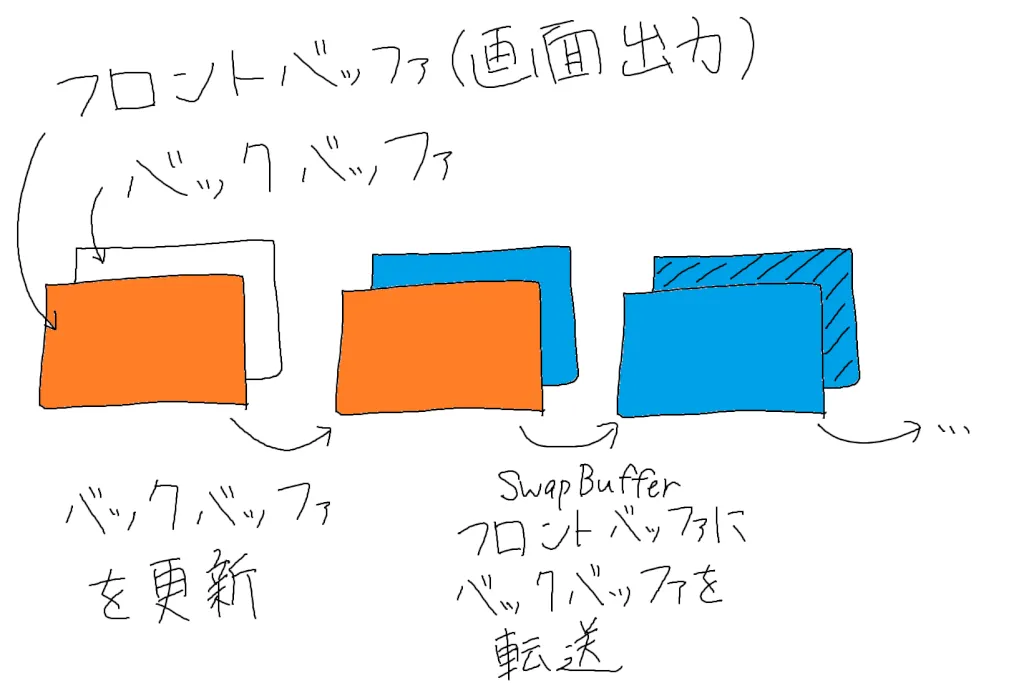
In the diagram: the front buffer is what’s shown on screen, and you update the back buffer behind it. SwapBuffer then transfers the back buffer to the front buffer, and the cycle repeats.
If you’re not sure, just use glfwSwapBuffers().
glfwPollEvents() retrieves events such as mouse and keyboard input and window resizing. Some sites said it isn’t needed because it’s included in glfwSwapBuffers(), but without it, my program didn’t work properly. Well, I guess it’s needed. (I’ve stopped thinking about it.)