
Updating this site has started to feel like a chore lately, but believing it’ll become a popular site someday, I’ll keep tossing (probably) useful information into the vast sea of the internet.
I’m mostly writing up the parts I stumbled over myself, so I’m sure it’s helping someone! I’m sure of it!
So (so what?), this time we’ll talk about the viewpoint.
What is a matrix?
It’s finally here.
But there’s no avoiding matrices when you do CG.
The word “matrix” may sound difficult, or it may remind you of the calculations you did in high school.
That’s understandable. Even if you studied them in high school, you just did calculation drills over and over, and nobody ever told you what they’re actually useful for. But today, they finally come in handy.
A matrix is, in a word, “movement.”
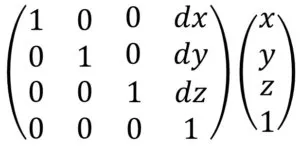
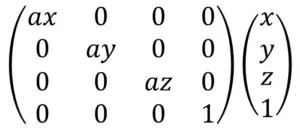
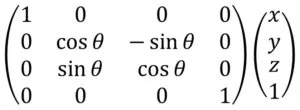
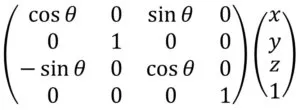
Here are some typical transformation matrices.
Translation matrix
Scaling matrix
Rotation matrix about the x-axis
Rotation matrix about the y-axis
Rotation matrix about the z-axis
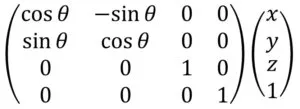
If you plug in numbers and work them out, you’ll see that each one gives you the coordinates of the vertex (x,y,z) after it has been moved.
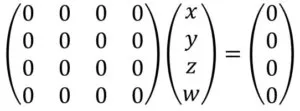
Zero matrix: multiplying it by any vector gives the zero vector
Identity matrix: multiplying it by any vector gives the same vector
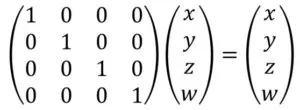
These are also very basic transformation matrices.
Projection and moving the viewpoint
In the programs so far (see the previous article), whenever we drew a vertex, each of the x, y, and z coordinates passed to gl_Vertex had to be within the range (-1,1).
But squeezing the data you want to display into the range (-1,1) is a lot of work. Perspective is also ignored.
That makes drawing a 3D space very inconvenient. You can solve this by multiplying every vertex by the ModelViewProjection matrix.
As the name says, it’s the product of the model transformation matrix, the view transformation matrix, and the projection transformation matrix. In other words, it applies three transformations.
Let’s go through them in order.
First, the model transformation matrix is used to move objects.
If you don’t need to move the object, just leave it as the identity matrix.
Next is projection. There are two kinds of projection: perspective projection and orthographic projection. Here, we’ll mainly look at perspective projection.
There’s a function called gluPerspective for perspective projection and one called glOrtho for orthographic projection, but for perspective projection, the mainstream approach is to use glm::perspective.
As shown in the figure below, perspective projection displays the objects inside the hexahedron that runs from the plane at distance znear from the viewpoint to the plane at distance zfar.
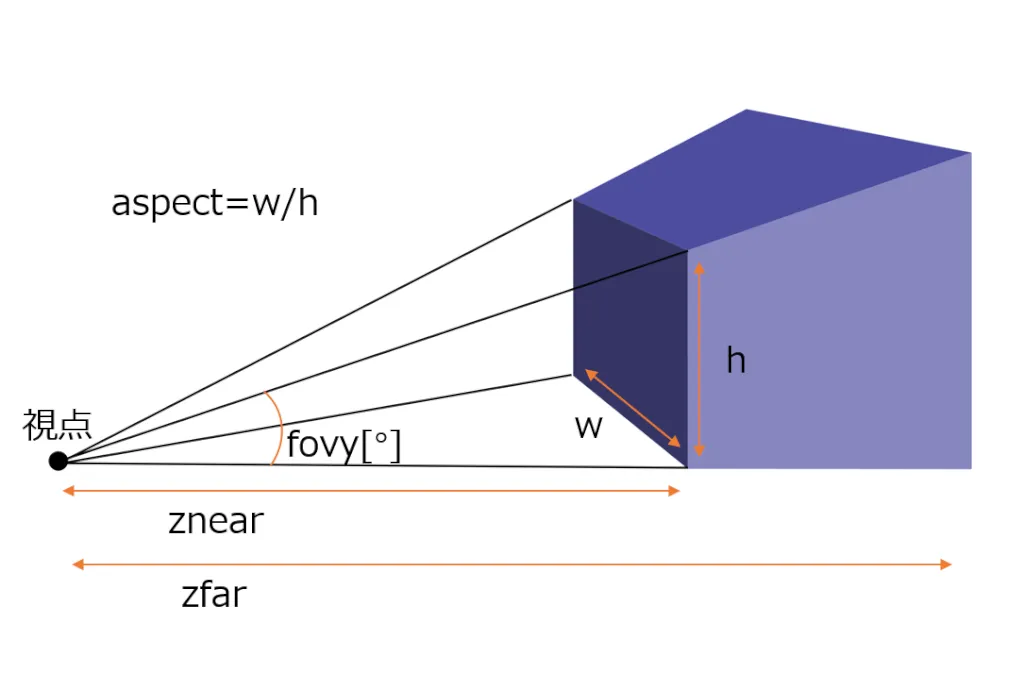
In the diagram, 視点 means “viewpoint.”
Pass the values shown in the figure above to glm::perspective(), and it returns the projection transformation matrix.
glm::mat4 glm::perspective(
    glm::radians(Fovy), // Zoom level (usually 90 to 30)
    aspect,		// Aspect ratio
    znear,		// Near clipping plane
    zfar		// Far clipping plane
);
The biggest benefit of applying this matrix is that you get perspective.
Next is the viewpoint. For this, you can get the view transformation matrix with glm::lookAt().
glm::mat4 glm::lookAt(
    glm::vec3(x,y,z), // Camera position in world space
    glm::vec3(x,y,z), // Position the camera looks at
    glm::vec3(x,y,z)  // Up direction. Setting it to (0,1.0,0) makes the y-axis point up
);
With it, you can move the viewpoint and change how things look.
If the arguments to glm::perspective() and glm::lookAt() aren’t all float types or all double types, you’ll get an error saying “no instance of overloaded function … matches the argument list.”
If you go with float, write a number like 0.5 as 0.5f.
Now let’s look at an actual program.
Before the whole program, let me explain uniform variables.
The MVP matrix is multiplied with each vertex in the vertex shader, so it has to be sent from C++ to GLSL. Uniform variables transfer data like this to the GLSL side.
/* C++ side */
// At initialization
// Get the handle of the uniform variable MVP
GLuint matrixID = glGetUniformLocation(shader, "MVP");

// Inside the loop (because the value to send may change as needed)
// Send the transformation matrix to the uniform variable "MVP" of the currently bound shader
// The fourth argument is the address of the first element of the matrix to send.
glUniformMatrix4fv(matrixID, 1, GL_FALSE, &mvpMat[0][0]);

/* GLSL side */
// This receives a 4x4 matrix.
// Other types work too, of course.
uniform mat4 MVP;
Here’s the whole program. initGLFW(), readShaderSource(), and makeShader() are the same as in the earlier articles (GLSL Built-in Variables and the Z-Buffer and Getting Started with GLSL Shaders).
#include "stdafx.h"
#include <iostream>
#include <string>
#include <fstream>
#include <sstream>
#include <gl/glew.h>
#include <GLFW/glfw3.h>

// Include the GLM features we use
#include <glm/glm.hpp>
#include <glm/gtc/matrix_transform.hpp>

//using namespace glm; would also work, but here we let only a few names skip "glm::"
using glm::vec3;
using glm::vec4;
using glm::mat4;

GLFWwindow* initGLFW(int width, int height)
{
    /*See an earlier article*/
}

int readShaderSource(GLuint shaderObj, std::string fileName)
{
    /*See an earlier article*/
}

GLint makeShader(std::string vertexFileName, std::string fragmentFileName)
{
    /*See an earlier article*/
}

int main()
{
    GLint width = 640, height = 480;
    GLFWwindow* window = initGLFW(width, height);

    GLint shader = makeShader("shader.vert", "shader.frag");

    GLuint matrixID = glGetUniformLocation(shader, "MVP");

    // Frame loop
    while (glfwWindowShouldClose(window) == GL_FALSE)
    {
        glUseProgram(shader);

        glEnable(GL_DEPTH_TEST);
        //glDepthFunc(GL_LESS);
        glClearColor(0.2f, 0.2f, 0.2f, 0.0f);
        glClear(GL_COLOR_BUFFER_BIT | GL_DEPTH_BUFFER_BIT);

        // They hold the identity matrix when declared
        mat4 modelMat, viewMat, projectionMat;

        // Compute the view matrix
        viewMat = glm::lookAt(
            vec3(1.0, 2.0, 6.0), // Camera position in world space
            vec3(0.0, 0.0, 0.0), // Position the camera looks at
            vec3(0.0, 0.0, 1.0)  // Up direction. Setting it to (0,1.0,0) makes the y-axis point up
        );

        // Compute the projection matrix
        projectionMat = glm::perspective(
            glm::radians(45.0f), // Zoom level (usually 90 to 30)
            (GLfloat)width / (GLfloat)height,		// Aspect ratio
            0.1f,		// Near clipping plane
            100.0f		// Far clipping plane
        );

        // Compute the ModelViewProjection matrix
        mat4 mvpMat = projectionMat * viewMat* modelMat;

        // Send the transformation matrix to the uniform variable "MVP" of the currently bound shader
        // The fourth argument is the address of the first element of the matrix.
        glUniformMatrix4fv(matrixID, 1, GL_FALSE, &mvpMat[0][0]);

        // Send the data for a triangular pyramid made of four polygons
        vec3 position[4][3] = {
            {vec3( 0, 0, 1),vec3(-1,-1, 0),vec3( 1, 0, 0)},
            {vec3( 0, 0, 1),vec3( 1, 0, 0),vec3( 0, 1, 0)},
            {vec3( 0, 0, 1),vec3( 0, 1, 0),vec3(-1,-1, 0)},
            {vec3(-1,-1, 0),vec3( 0, 1, 0),vec3( 1, 0, 0)}
        };
        vec4 color[4] = { vec4(1,0,0,1), vec4(0,1,0,1), vec4(0,0,1,1), vec4(1,1,0,1)};
        for (int i = 0; i < 4; ++i)
        {
            glColor4f(color[i].r, color[i].g, color[i].b, color[i].a);
            glBegin(GL_TRIANGLES);
            glVertex3f(position[i][0].x, position[i][0].y, position[i][0].z);
            glVertex3f(position[i][1].x, position[i][1].y, position[i][1].z);
            glVertex3f(position[i][2].x, position[i][2].y, position[i][2].z);
            glEnd();
        }

        // Swap the double buffers
        glfwSwapBuffers(window);
        glfwPollEvents();
    }

    // Shut down GLFW
    glfwTerminate();

    return 0;
}
#version 120
//
// shader.vert
//
uniform mat4 MVP;
void main(void)
{
gl_Position = MVP * gl_Vertex;
gl_FrontColor = gl_Color;
}#version 120
//
// shader.frag
//
void main(void)
{
gl_FragColor = gl_Color;
}In shader.vert, gl_Position = MVP * gl_Vertex; multiplies each vertex by the MVP matrix.
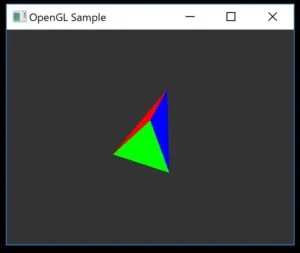
Now that you can change the viewpoint and the object’s vertices, you’ve reached the point where you can do quite a lot.
It may be tough, but let’s keep at it.
By the way, some people may get confused by functions like gluLookAt() and gluPerspective() (mainly me). That’s because with these functions, there’s no return value you need to do anything with.
Actually, calling gluLookAt() or gluPerspective() sets values in a built-in variable called gl_ModelViewProjectionMatrix.
This is one of the things that got complicated because OpenGL evolved while keeping compatibility.