
What I’d planned to cover last time turned out to be longer than I expected.
So this time, I’ll continue explaining GLSL.
CG requires a lot of knowledge, which makes it tough.
That’s what makes it fun, though.
GLSL built-in variables
I couldn’t find official documentation for OpenGL 3.2 or earlier, so I looked at the OpenGL 3.3 documentation instead. It lists the built-in variables as follows.
Well, they’re mostly the same as in the earlier versions.
Vertex shader (inputs)
vec4 gl_Color;
vec4 gl_SecondaryColor;
vec3 gl_Normal;
vec4 gl_Vertex;
vec4 gl_MultiTexCoord{0-7};
float gl_FogCoord;
Vertex shader (outputs)
gl_PerVertex {
    vec4 gl_Position;
    float gl_PointSize;
    float gl_ClipDistance[];
    vec4 gl_ClipVertex;
};
vec4 gl_FrontColor;
vec4 gl_BackColor;
vec4 gl_FrontSecondaryColor;
vec4 gl_BackSecondaryColor;
vec4 gl_TexCoord[];
float gl_FogFragCoord;
Fragment shader (inputs)
vec4 gl_FragCoord;
bool gl_FrontFacing;
float gl_ClipDistance[];
vec2 gl_PointCoord;
int gl_PrimitiveID;
Fragment shader (outputs)
float gl_FragDepth;Some of you may have noticed that gl_FragColor isn’t among the fragment shader outputs.
In fact, gl_FragColor has been removed in newer GLSL.
You might think, “Then isn’t it pointless to learn it?” Not at all: newer GLSL has just changed the way you write gl_FragColor.
So rest assured that almost everything you learn here carries over as is when you write newer GLSL.
Built-in variables such as gl_Vertex and gl_Normal, which pass data from the C++ program to GLSL, are effectively no longer used.
A replacement for them also works in OpenGL 2.1, so I’ll explain it along with VBOs in a later article.
The Z-buffer method and the z value of gl_Position
The Z-buffer method (depth buffer method) is a technique that draws the colors visible from the viewpoint.
It has drawbacks, such as needing a lot of memory and not handling the transparency of translucent objects well, but it’s very fast.
The local coordinate system I explained last time actually has a z-axis too. I believe x, y, and z each range over (-1,1), but nothing was drawn at z=1, so z may actually be (-1,1].
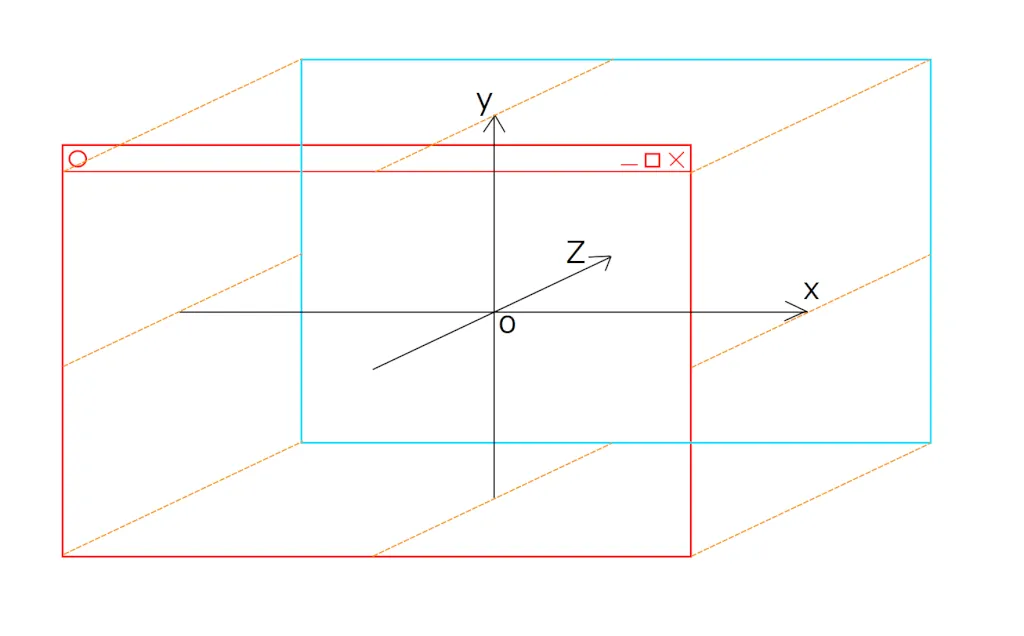
So the z value set in GLSL’s gl_Position becomes the depth. By the way, w holds 1.0.
As for the program we made last time: by default, OpenGL doesn’t use this z value to decide what’s in front (the depth test is disabled).
As a test, change the glColor4f(); glBegin; … glEnd(); part of the previous program as follows.
This sends two polygons with different colors and vertex coordinates to GLSL.
        //Red polygon
        glColor4f(1.0, 0.0, 0.0, 1.0);
        glBegin(GL_TRIANGLES);
        glVertex3f(0.0, 0.5, -1.0);
        glVertex3f(-0.5, -0.5, -1.0);
        glVertex3f(0.5, -0.5, -1.0);
        glEnd();

        //Yellow polygon
        glColor4f(1.0, 1.0, 0.0, 1.0);
        glBegin(GL_TRIANGLES);
        glVertex3f(0.0, 0.0, 0.0);
        glVertex3f(-1.0, -0.5, 0.0);
        glVertex3f(0.5, -0.8, 0.0);
        glEnd();
The result looks like this.
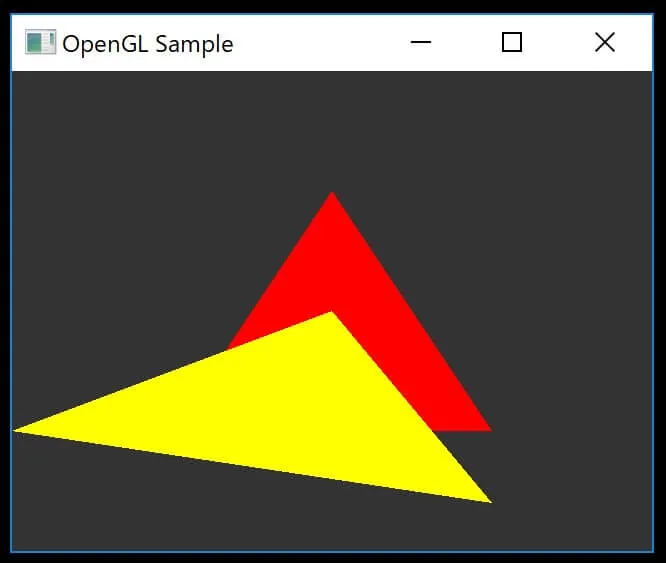
The red polygon has the smaller z value, so it should be in front, but the yellow polygon ends up in front instead.
That’s because the polygons were drawn in the order they were sent to GLSL.
Let’s make the drawing reflect the depth information. Add the following before drawing the polygons (you can see where it goes in the whole program below).
// Enable the depth test
glEnable(GL_DEPTH_TEST);
// Accept the fragment if it is closer to the camera than the previous one
glDepthFunc(GL_LESS);

glClearColor(0.2f, 0.2f, 0.2f, 0.0f);
// Clear the screen
glClear(GL_COLOR_BUFFER_BIT | GL_DEPTH_BUFFER_BIT);
Here’s the whole program.
I want to omit the setup code from the next article on, so I’ve gathered it into an initGLFW() function. It uses a pointer, but don’t worry: it just returns the GLFWwindow pointer. readShaderSource() and makeShader() are the functions from the previous article.
#include "stdafx.h"
#include <iostream>
#include <string>
#include <fstream>
#include <sstream>
#include <gl/glew.h>
#include <GLFW/glfw3.h>

GLFWwindow* initGLFW(int width, int height)
{
    // Initialize GLFW
    if (glfwInit() == GL_FALSE)
    {
        return nullptr;
    }

    // Create a window
    GLFWwindow* window = glfwCreateWindow(width, height, "OpenGL Sample", NULL, NULL);
    if (!window)
    {
        glfwTerminate();
        return nullptr;
    }

    // Specify version 2.1
    glfwWindowHint(GLFW_CONTEXT_VERSION_MAJOR, 2);
    glfwWindowHint(GLFW_CONTEXT_VERSION_MINOR, 1);

    glfwMakeContextCurrent(window);
    glfwSwapInterval(0);

    // Initialize GLEW
    if (glewInit() != GLEW_OK)
    {
        return nullptr;
    }

    return window;
}

int readShaderSource(GLuint shaderObj, std::string fileName)
{
    /*See an earlier article*/
}

GLint makeShader(std::string vertexFileName, std::string fragmentFileName)
{
    /*See an earlier article*/
}


int main()
{
    GLint width = 640, height = 480;
    GLFWwindow* window = initGLFW(width, height);

    GLint shader = makeShader("shader.vert", "shader.frag");

    // Frame loop
    while (glfwWindowShouldClose(window) == GL_FALSE)
    {
        glUseProgram(shader);

        // Enable the depth test
        glEnable(GL_DEPTH_TEST);
        // Accept the fragment if it is closer to the camera than the previous one
        glDepthFunc(GL_LESS);

        glClearColor(0.2f, 0.2f, 0.2f, 0.0f);
        // Clear the screen
        glClear(GL_COLOR_BUFFER_BIT | GL_DEPTH_BUFFER_BIT);//glClear(GL_COLOR_BUFFER_BIT);

        //Red polygon
        glColor4f(1.0, 0.0, 0.0, 1.0);
        glBegin(GL_TRIANGLES);
        glVertex3f(0.0, 0.5, -1.0);
        glVertex3f(-0.5, -0.5, -1.0);
        glVertex3f(0.5, -0.5, -1.0);
        glEnd();

        //Yellow polygon
        glColor4f(1.0, 1.0, 0.0, 1.0);
        glBegin(GL_TRIANGLES);
        glVertex3f(0.0, 0.0, 0.0);
        glVertex3f(-1.0, -0.5, 0.0);
        glVertex3f(0.5, -0.8, 0.0);
        glEnd();

        // Swap the double buffers
        glfwSwapBuffers(window);
        glfwPollEvents();
    }

    // Shut down GLFW
    glfwTerminate();

    return 0;
}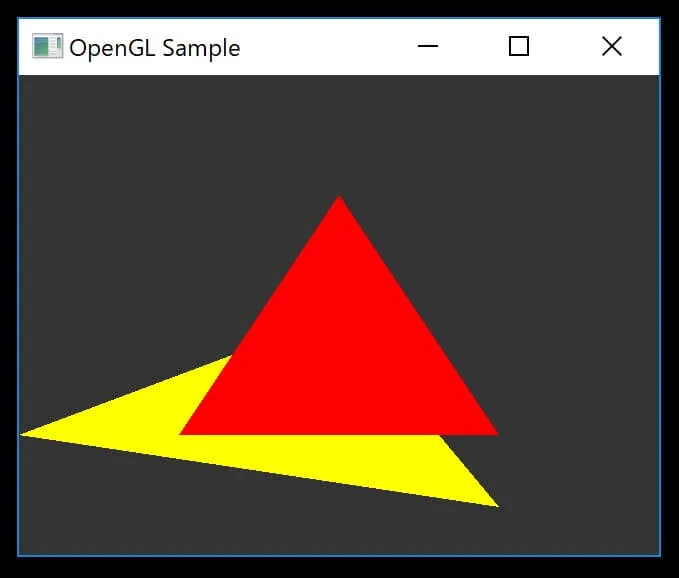
You can see that the depth from the viewpoint is now properly reflected.