Long explanations of history and internals would put you to sleep, so I’d rather skip them, but these are the parts I stumbled over badly while teaching myself, so I think I have to explain them. I’ll still do my best to keep it short.
You don’t need to understand everything, but it’s good to know the big picture, so I’ve collected it here in part 1. Skimming it the first time is fine.
Your understanding of OpenGL should deepen as you move on to the later articles, so come back and read it again then.
A rough, bare-minimum look at the hardware
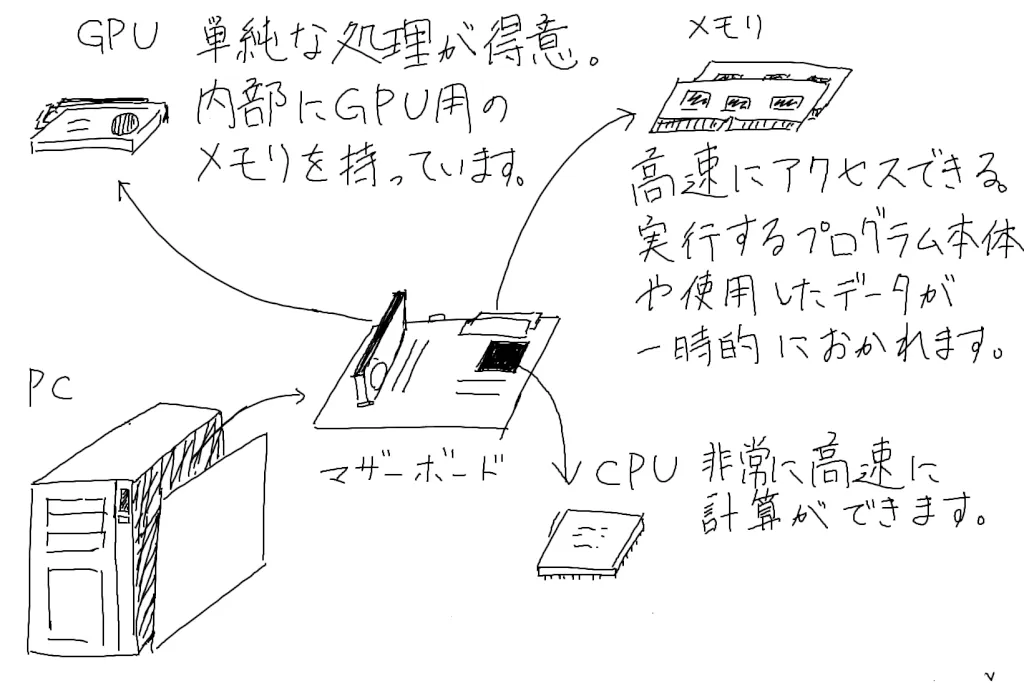
In the diagram: the GPU is good at simple processing and has its own memory inside. Memory can be accessed quickly and temporarily holds the programs being run and the data they use. The CPU can compute very fast. The GPU, memory, and CPU are connected to the motherboard inside the PC.
Graphics drivers are supplied with CPUs and GPUs. The CPU is basically the brain of the computer, and the GPU assists it. The main graphics drivers are made by Intel, NVIDIA, AMD, and others.
NVIDIA and AMD make a part called a GPU (graphics card). To put it very roughly, a GPU is a part that can run simple programs extremely fast. OpenGL uses the GPU to generate images quickly. Basically, what you’ll be writing are programs called shaders, which run on the GPU.
However, not every PC needs high performance, so many PCs don’t have a GPU installed. In that case, the CPU does the processing, but CPUs are inherently bad at this kind of graphics work. So, a long time ago, CPUs took in GPU functionality.
Of course, it’s nowhere near as good as a PC with a GPU installed. This is called integrated graphics, or onboard graphics (because the feature used to sit on the motherboard), or simply “onboard.”
I wrote this for people who don’t know about CPUs and GPUs, and I put giving you a rough picture first, so it isn’t strictly accurate in places. The parts used in PCs are a deep topic once you start looking into them, so you might give it a try if you feel like it.
Why not use a newer OpenGL?
This series uses OpenGL 2.1. As I wrote in part 0, that’s because many PCs don’t support newer versions.
Update
Newer versions almost always let you write things more concisely, and honestly, I don’t think there’s much reason to support old PCs anymore. You’ll be much happier developing with version 4 or later, or at least version 3 or later.
Manufacturers are competing fiercely on both GPUs and CPUs, so performance keeps improving and features keep increasing. Naturally, OpenGL is evolving to take advantage of those features.
However, older GPUs and CPUs may not support the new features. And when you write programs, you don’t always need the latest features.
Of course, if you need the new features, you should use a newer OpenGL. In that case, all you can tell your users is, “If you want to run this program, buy a more expensive PC.”
This is especially noticeable with games. Plenty of people buy a new PC just to play a new game.
The current state of GLU (OpenGL Utility Library)
GLU is a library that assists OpenGL, with functions such as gluLookAt and gluPerspective. They set things like the viewpoint.
To cut to the chase: you can probably still use GLU today, but these days you basically use GLM (a matrix library for OpenGL), which is more capable.
I haven’t looked into it in detail, but it’s doubtful whether newer OpenGL versions support GLU, and there’s no benefit in going out of your way to use a library that has been left untouched for more than 10 years.
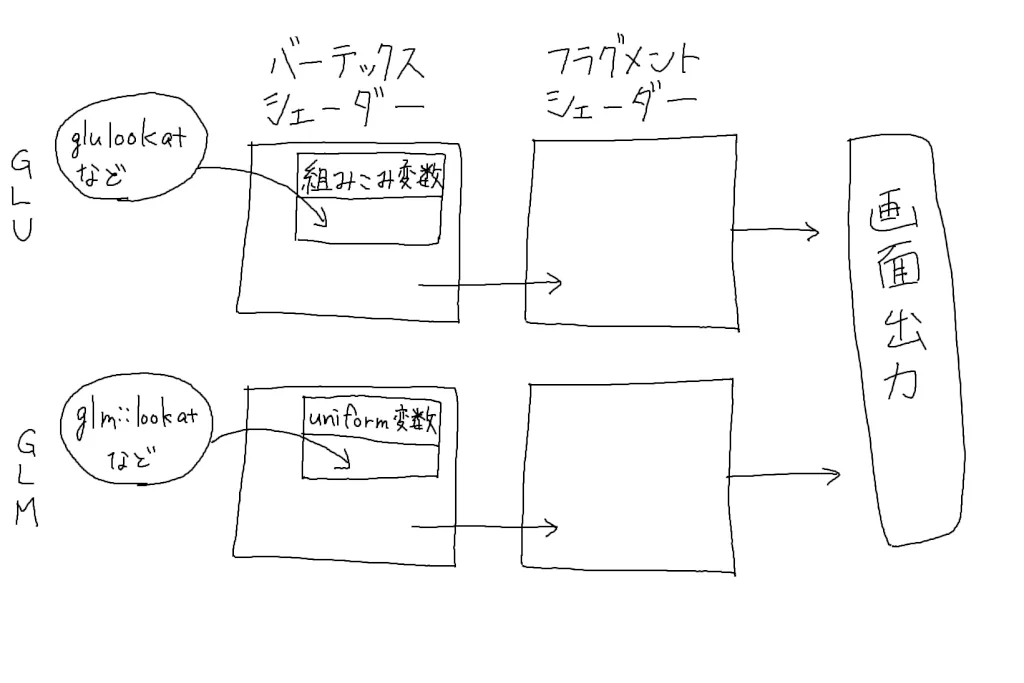
In the diagram: with GLU, functions such as gluLookAt set built-in variables in the vertex shader. With GLM, functions such as glm::lookAt pass values to the vertex shader as uniform variables. In both cases, processing continues from the vertex shader to the fragment shader and then to the screen.
I’ll explain this in detail in a later article, but gluLookAt and gluPerspective set values in a built-in variable called gl_ModelViewProjectionMatrix. Nowadays, though, the mainstream approach seems to be to build the ModelViewProjection matrix on the C++ side with glm::lookAt, glm::perspective, and so on, and send it to the shader as a uniform variable.
Kinds of graphics libraries
There are OpenGL (GLSL), DirectX (HLSL), Vulkan, Cg, Java 3D, and others. (The names in parentheses are the shader languages used with each.)
The best known are OpenGL, which is open source, and DirectX, which is developed by Microsoft. DirectX runs only on Windows, while OpenGL runs in many different environments. If you’re doing CG (computer graphics), you’ll probably end up using one of these two.
Vulkan allows very advanced tuning for building software such as VR applications. So although it’s positioned as OpenGL’s successor, it demands more knowledge and skill than OpenGL. (Vulkan isn’t the successor because OpenGL has some fatal flaw; the two are just meant for different uses.)
So I think you can treat it as something separate from OpenGL. OpenGL is still being developed and will keep evolving, so don’t worry.
Cg is no longer being developed, and there’s absolutely no reason to start using it now.
Java 3D barely has a presence in the first place. Honestly, I’ve never seen anyone use it. I’m not really sure why it exists. You can use OpenGL from Java too, so use that instead.
In short, use either OpenGL or DirectX.
CG is the art of faking it
Not just CG: programming in general is, no matter how far you go, the art of faking it.
Types such as int and double exist in C and other languages because a computer’s computing resources are finite. It’s impossible to represent infinitely many numbers on a computer, so only a practical range is supported.
The same goes for CG programming. You can’t draw infinitely smooth curves or surfaces.
What matters is that they look like curves and surfaces when they’re shown on screen.
So, basically, curves are approximated with multiple straight lines.
Good old OpenGL and the new OpenGL
Let’s take a quick look at OpenGL’s history.
| Year | Version |
|---|---|
| 1992 | OpenGL 1.0 |
| 1997 | OpenGL 1.1 |
| 2006 | OpenGL 2.1 |
| 2008 | OpenGL 3.0 |
| 2010 | OpenGL 3.3 |
| 2010 | OpenGL 4.0 |
| 2010 | OpenGL 4.1 |
| 2011 | OpenGL 4.2 |
| 2012 | OpenGL 4.3 |
| 2013 | OpenGL 4.4 |
| 2014 | OpenGL 4.5 |
| 2017 | OpenGL 4.6 |
OpenGL 1.x had functions such as glRotate and glScale. These rotate or scale the polygons you want.
I’ll say this up front: these functions are now deprecated, and today this kind of processing is done in shaders with matrix calculations and the like. (That said, GLM provides replacements for glRotate and glScale, so you don’t need to overthink it.)
The advantage of these functions is that you can write programs without knowing anything about matrix math. Maybe that’s partly why some people call it “good old” OpenGL. I learned this at university, but why did they teach it when nobody uses it anymore? The drawbacks are that it’s inflexible and wasteful.
In OpenGL 2.1, the programmable shader language GLSL became part of the standard specification.
OpenGL 3.0 slimmed down the bloated OpenGL specification, and many features were deprecated and slated for removal. However, to maintain compatibility across versions, OpenGL lets you use the removed functions as extensions. I feel this makes the specification even more complicated…
OpenGL 4.x has been evolving very quickly so as not to lose out to its rival DirectX (until then, it had been fairly slow).
Explaining it in detail here would make things messy, so if you’re curious, check Wikipedia.
Starting with the next article, we’ll finally write some code.